The BAZON plugin turns your BeeGraphy geometry into a complete, machine-ready manufacturing package. It is built for furniture production and CNC preparation, automating the step that usually eats the most time on a shop floor: getting clean panel definitions, drilling instructions, and machine files out of a 3D model and onto the machines that cut them.
Instead of manually preparing NC programs, labels, and previews for every part, you connect a short node pipeline and let BAZON generate everything in one export.
BAZON takes your finished part geometry, together with its machining operations and edge-banding information, and outputs a single .zip archive containing everything the shop needs:
Milling (NC): CNC programs for panel sizing and routing.
Edge drilling (NC): instructions for horizontal and vertical boring.
Label machine files: .xml and .cyc files for automated labeling stations.
Part previews (BMP): visual labels for workshop staff showing part dimensions, material, and hole positions.
The result is a hand-off-ready package: programs for the machines,
Open the Plugin Manager in your BeeGraphy workspace, find BAZON in the package list, and click Add. Once installed, the plugin's nodes become available in your editor's node search under the Data and Exporter groups.
BAZON works as a three-node pipeline. Geometry and manufacturing data flow from left to right: you tag your edges, merge everything into a single part definition, then export the package.
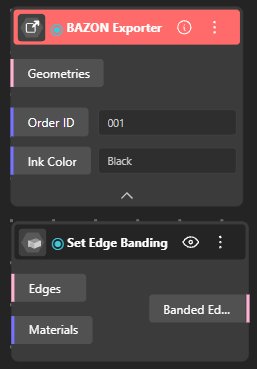
This node assigns specific edge-banding materials to the edges of a panel. It matters because a single furniture part often needs different finishes on different edges — for example, a thicker 2 mm PVC band on the visible front edge and a thin 0.4 mm band on the back.
Inputs: edge geometries and material labels.
What it does: pairs each edge with a banding material and tags the geometry with metadata. The exporter reads these tags later to draw the correct labels and generate the right machine instructions.
Think of this as labeling your part so the rest of the pipeline knows how each edge should be finished.
This is the aggregation step. It combines all of a part's manufacturing attributes into one complete part definition.
Inputs: machine configurations, part geometry, drilling and milling operations (OpsGeom), and the edge-banding data from the previous node.
What it does: syncs the geometry with its machining operations and orientation, assembling a single, export-ready definition of the part.
By the time data leaves this node, the part "knows" its shape, its operations, how it should be oriented, and how its edges are banded.
The final stage. It processes the merged part definition and generates the complete manufacturing package described above (the milling NC, edge-drilling NC, label files, and BMP previews), delivered as a single .zip archive ready to download and send to your machines.
Automatic NC generation. BAZON writes the CNC programs for you, with support for Fanuc and other post-processors, so you are not hand-editing G-code per part.
Intelligent labeling. The exporter generates bitmapped part previews that include indicators for which edges are banded, giving operators a clear visual reference at a glance.
Nesting ready. BAZON integrates rotation data from nesting algorithms. When parts are rotated to pack efficiently onto a sheet, drilling and operation coordinates stay accurate regardless of the final orientation.
Material detection. The plugin automatically detects stock thickness and uses it to calculate the correct Z-depths for CNC operations, so cut and bore depths match the material you are actually running.
Model or import your panel geometry in BeeGraphy.
Use Set Edge Banding to assign banding materials to the relevant edges.
Add your drilling and milling operations, then bring everything together with Merge Operations, along with your machine configuration.
Connect the merged result to the BAZON Exporter.
Run the export and download the .zip package — your NC programs, label files, and part previews are ready for the shop.
Because the exporter relies on the metadata set upstream, make sure every edge that needs banding is tagged in Set Edge Banding before merging. Untagged edges will simply be treated as bare.
The nesting integration means you can run your parts through a nesting step without worrying about losing drilling accuracy — orientation is handled for you.
Stock thickness is detected automatically, but confirm your input geometry reflects the real material thickness so Z-depths come out correct.
