Master the essentials: data types, lists, and data trees—the building blocks of organized, parametric design in BeeGraphy.
A Data type defines the nature and format of information that a component can accept, process, or output. In BeeGraphy environment, every wire carries data of a particular type.
Data types ensure, values are interpreted correctly, operations behave predictably, and components can communicate smoothly. Following are a few examples of Data Types available in BeeGraphy.
Number (integers, decimals etc)
Text (strings)
Boolean (true/false)
Points / Vectors / Geometry (geometric data)
Lists (single-level lists)
Trees (hierarchical structured lists)
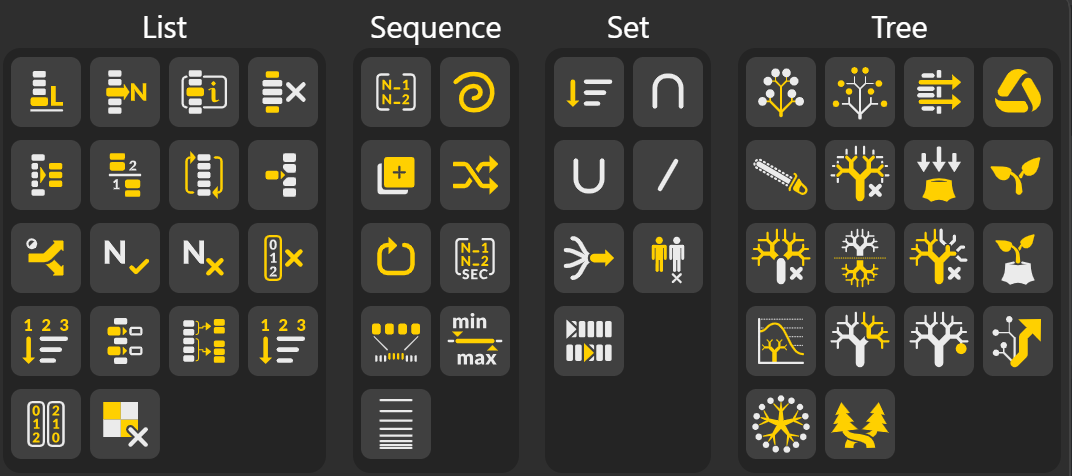
In BeeGraphy, a list is an ordered collection of data items—such as numbers, points, vectors, curves, or any other data type. Each element in the list occupies a specific position known as its index, with indexing beginning at 0 for the first item.
List Length eturns the total number of items in a list.
Useful for understanding the size of the dataset or controlling loops and iterations.
List Item: Retrieves the item at a specific index in the list.
Indexing starts at 0, so index 0 returns the first element.
Item Index: Searches the list and returns the index where a specified item occurs.
If the item appears multiple times, it can return multiple indices.
Remove Subset: Removes a block (range) of items from the list based on a given interval of indices.
Extract Subset: Extracts a portion of the list—defined by start and end indices—without altering the original list.
Split List: Divides a list into two separate parts at a specified index:
items before the split
items after the split
Reverse List: Reorders a list by flipping the sequence of its elements so that the last item becomes the first and the first becomes the last.
Insert List Items: Inserts one or more items into an existing list at a specified index.
The original items shift forward to make space.
Dispatch List: Separates a list into two lists based on a matching Boolean pattern.
True items go to List A
False items go to List B
10. Take Nth: Creates a new list by taking every n-th item from the original list.
Example: taking every 3rd item selects indices 0, 3, 6, 9…
Remove Nth: Removes every n-th item from the list. Useful for thinning or sampling data.
Remove by Index: Deletes items located at specific indices. Indices may be single values or multiple values.
Number Sort List: Sorts numerical values into ascending or descending order, depending on input. Often outputs both sorted values and their original indices.
Replace Items: Replaces one or more list items at specific indices with new values.
Partition List: Divides a list into smaller sublists (groups) of a specified size.
Example: grouping a list of 20 items into chunks of 5.
Sort List (General): Sorts items based on numeric, text, or referenced key values.
Reorders the list while preserving value-index relationships.
Ascending / Descending Sort: Specifically sorts items from:
Lowest → Highest (ascending)
Highest → Lowest (descending)
Remove Pattern: Removes items based on a Boolean pattern. Where the pattern is True, the item is removed; where False, the item is kept.
A sequence is an ordered list of elements arranged according to a specific rule or pattern.
Unlike a general list, a sequence emphasizes the order of elements and the relationship between consecutive terms.
List Sequence Generates a list of numbers following a specific rule such as a start value, step size, and total count. Used for creating evenly spaced numeric progressions.
Fibonacci: Generates the Fibonacci sequence
Duplicate List: Produces a new list where selected items or the entire list are repeated, often based on input counts. Useful for patterning or expanding data sets.
Random Number List: Generates a list of random values within a specified numerical range and length.
Repeat List: Repeats the entire list a specified number of times, producing a longer list made of repeated cycles of the original data.
List Sequence SEC: Creates a structured progression of numbers where each segment follows its own step or pattern, often used for nested or multi-level sequences.
Remap Numbers Takes a list of values and maps them from their original numeric domain into a new target domain. While preserving their proportional relationships.
Source min / Source max → the bounds of the original domain.
Target min / Target max → the bounds of the new domain you want to convert into.
Bounds: Returns the minimum and maximum values in a list, defining the numeric domain of the dataset.
Grow Step Sequence: Generates a sequence where the step size increases progressively instead of remaining constant. Commonly used for non-linear spacing, gradual scaling, or logarithmic-style distributions.
Sets are primarily used for operations based on membership and comparison, such as union, intersection, and difference, focusing on the value of the elements rather than their position.
List Order Changing: Reorders the elements of a list according to a specified rule or pattern. This does not add or remove data; it only changes the positions of items within the list.
List Intersection Finds the common items between two lists. The output contains only the elements that appear in both lists.
List Union: Combines two lists and removes any duplicates, producing a set of all unique elements that appear in either list.
List Difference Returns the items that appear in the first list but not in the second list. This operation helps filter out unwanted elements by comparison.
List Merge: Combines multiple lists into a single list. Unlike union, merging preserves all items, including duplicates and original ordering.
Delete Consecutive: Removes repeated items that occur one after another in a list, keeping only the first instance in each consecutive run.
Shift List: Moves items in a list forward or backward by a specified number of positions. Items shifted past the end can be wrapped around to the beginning depending on settings.
A data tree is a hierarchical data structure that organizes information into multiple branches, where each branch contains its own list of elements.
Each branch is uniquely identified by a path, which describes the position of the branch within the hierarchy.
Construct Path: Creates a new data tree path using one or more integers. This path acts like an "address" that tells Grasshopper where to store a specific piece of data.
Deconstruct Path: Breaks a tree path into its individual integers. This lets you inspect or use the structure of a path for further operations.
Stream Filter: Selects one output stream from multiple input streams using a switch index. Only the chosen stream passes through, while the others are ignored.
Weave: Interlaces items from multiple lists or branches into a single structure based on a defined pattern. It controls how data from different sources is interwoven.
Clean Tree: Removes nulls, empty branches, invalid items, and sometimes duplicates from a data tree. It simplifies the tree without changing the essential structure.
Trim Tree: Cuts off one or more levels from the beginning or end of a tree path. This reduces the depth of the data structure while keeping the items intact.
Flatten Tree: Converts all branches of a data tree into a single list by removing all path structure. Every item ends up in the same branch with no hierarchy.
Graft Tree: Adds a new level to the path of each item, placing every item into its own unique branch. This increases tree depth and isolates data for controlled operations.
Simplify Tree: Removes redundant or unnecessary path information by simplifying branch paths to their shortest valid form. It keeps the structure intact but cleans extra zeros or repeated indices in the paths.
Flip Tree: Swaps the rows and columns of a data tree by interchanging branch indices with item indices. This reorganizes data so that items that were in the same positions across branches become grouped together.
Prune Tree: Removes empty branches or branches that do not contain meaningful data. This cleans the structure without altering the items that remain.
Unflatten Tree: Rebuilds a hierarchical structure from a flattened list by using a supplied template tree. It restores data into branches that match the pattern of the reference tree.
Tree Statistics: Displays structural information about a data tree, such as the number of branches, number of items per branch, tree depth, and the paths of each branch.
Tree Branch (Maintain Paths): Extracts selected branches from a tree while preserving the original paths. This allows you to isolate parts of the tree without losing the original hierarchical context.
Tree Item Retrieves a specific item from a defined branch and index within a data tree. It lets you directly access an element using its precise tree location.
Shift Paths: Moves branch paths up or down by adding or removing index levels. This changes where data is stored within the tree without affecting the items themselves.
Path Mapper: Transforms tree paths from one structure to another using a mapping rule. It rewrites paths according to a pattern, allowing highly controlled restructuring of complex trees.
Entwine Tree: Combines multiple lists or trees into a single tree while preserving each input as a separate branch. It provides a clean, organized way to bundle data sources together into a unified tree.
