
Input nodes let you bring external data into your parametric model whether it’s text, images, vector paths, 3D objects, or numeric values.
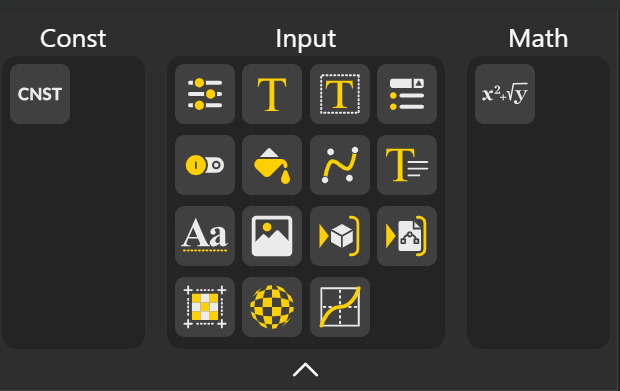
CONST Nodes:
Cnst: Provides a fixed, unchanging value/number to the graph.
Input Nodes:
Range Input: Allows selection of a numeric value within a specified range. You can assign measurement units directly to Range Input nodes, allowing your inputs to represent real-world values instead of raw numbers. Unit settings also extend to the configurator, ensuring consistency between your workspace and end-user inputs.
Text Input: Accepts a single line of text.
Text Area Input: Accepts multi-line text input.
Select: Provides a dropdown menu to choose one option.
Select with Thumbnail improves option selection by displaying visual previews alongside configurable choices. Instead of choosing from text-only dropdowns, users can browse and select options through thumbnail images, making configurators more intuitive, visually engaging, and easier to navigate.
Boolean: Accepts true/false values.
Color Picker: Lets you choose colors to drive parameters or geometry appearance.
Curve Editor: Allows custom curve creation for parametric control.
Rich Text Editor: Accepts formatted text input, including styling and links.
Font: Create 3D-ready text shapes by converting written characters into editable geometry.
Image Input: Import an image to use its pixels for masking, referencing, tracing, or driving geometry.
Object 3D: Load external 3D models into your scene to reuse, edit, transform, or combine with other geometry.
Vector Graphics Input: Bring in SVG or vector paths to convert 2D graphics into precise curves and shapes for modeling.
UV Mapping: Control how a 2D texture wraps onto a 3D surface so patterns align cleanly and without distortion.
Texture: Apply images or patterns onto surfaces to add color, detail, material feel, or structural variation.
Graph Mapper: Remap, reshape, and control values through customizable curves to create smooth transitions and dynamic parametric behavior.
Math
Math Expression: Allows you to enter a custom mathematical formula or expression to compute values dynamically inside your graph.