Vector Nodes give you the building blocks to work with direction, position, and orientation inside your parametric model. From constructing points, measuring distances, analyzing relationships, defining planes, and performing vector math. These nodes help you control the geometry in 2D and 3D space.
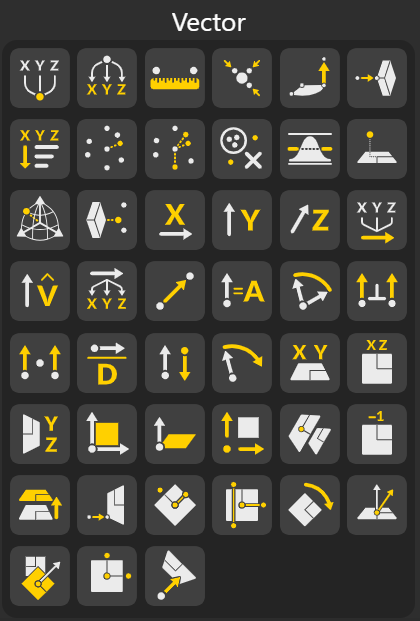
Creates a point using X, Y, Z coordinates, allowing you to define exact spatial locations for building geometry or setting reference markers.
Breaks a point into its individual X, Y, and Z values, making it easy to extract coordinates for calculations or further operations.
Calculates the straight-line distance between two points, useful for measuring spacing, lengths, or verifying geometric relationships.
Stores or organizes multiple points into a structured list that can be used for curves, surfaces, or repeated operations.
Generates a point using cylindrical inputs like radius, angle, and height, ideal for circular or rotational designs.
Finds the nearest point on a geometry relative to a reference point, helping with snapping, projection, or alignment tasks.
Sorts points based on criteria such as coordinate values or distance, allowing ordered processing or structured outputs.
Determines which point from a set lies closest to a reference point, often used in matching or selection tasks.
Finds nearest pairs between two point sets, helping compare or map relationships between distributed points.
Removes repeated or identical points from a list to clean datasets and prevent overlaps or unwanted redundancy.
Computes a location inside a triangle using barycentric coordinates, often used in interpolation and triangle-based calculations.
Creates a point embedded with orientation vectors for use in directional placement or object alignment.
Constructs a point using polar coordinates, making radial layouts or circular geometries straightforward.
Projects a point onto a target geometry or surface, enabling constraints, surface interaction, or geometric corrections.
Extracts the respective component of any vector for targeted use in calculations or decomposition.
Builds a vector from X, Y, and Z values, forming a directional line or movement reference.
Normalizes a vector to unit length, preserving its direction while controlling its magnitude.
Splits a vector into its X, Y, and Z components for clear analysis or manipulation.
Creates a vector describing the direction and magnitude from one point to another.
Returns the magnitude (length) of a vector, often used for measuring strength or size of directional relationships.
Calculates the angle between two vectors, useful for orientation, alignment, or structural analysis.
Produces a vector perpendicular to two given vectors, commonly used to generate normal or define planes.
Computes the scalar dot product, indicating how aligned or perpendicular two vectors are.
Returns the total length of a vector, helpful for measuring distances and scaling operations.
Flips the direction of a vector while keeping its magnitude unchanged.
Rotates a vector around a chosen axis by a given angle, enabling turning, orientation shifts, or motion paths.
Provides the standard Cartesian planes as base reference systems for constructing geometry.
Creates a fully custom plane by defining an origin point along with the X and Y axis directions. This gives you complete control over the plane's orientation and position in 3D space.
Generates a plane using a point and a normal vector. The normal determines the plane’s perpendicular orientation, ensuring the surface faces a specific direction. This is often used when you need a plane aligned to a surface’s normal or a directional field.
Breaks a plane into its core components: the origin, X-axis vector, Y-axis vector, and the normal vector. This allows you to inspect the plane’s structure or reuse its components in other operations, such as constructing new coordinate systems or aligning geometry.
Extracts only the origin point of a plane. This is useful for locating the plane's position, placing geometry relative to it, or using the origin as a reference for transformations or measurements.
Reverses the direction of a plane’s normal while keeping its origin and axes intact. This is helpful when orientation matters, for example, correcting inverted planes or adjusting the facing direction for surface operations.
Creates a new plane that is parallel to an existing one but shifted by a defined distance along its normal. This is useful for generating layered planes, offsets for construction, or reference levels within a model.
Projects a point onto a plane and returns the closest point on that plane. This is used for flattening geometry, mapping points into planar coordinates, or calculating distances and projections.
Constructs a plane using one reference line and another point not lying on that line. The line defines one axis of the plane, while the additional point ensures a unique orientation. Ideal when building planes from structural edges, paths, or directional guides.
Forms a plane using two intersecting lines. The intersection defines the origin, and the directions of the lines define the plane's axes. This method is especially useful when constructing planes from frameworks, intersections, or grid lines.
Rotates an existing plane around its own origin or a specified axis. This allows precise reorientation while maintaining the plane’s position, making it useful for adjusting reference frames or aligning geometry at specific angles.
Modifies a plane's location or orientation based on new input conditions. You can reposition its origin, alter its axes, or realign it to better fit your geometric layout. Helpful for refining construction planes as designs evolve.
Matches one plane’s origin, axes, and overall orientation to another plane or geometric reference. This ensures consistent alignment across operations and is frequently used when standardizing coordinate systems.
Creates a plane passing through any three non-collinear points. This guarantees a unique planar surface defined purely by geometry—useful when building planes from existing shapes, measurement data, or anchor points.
Extracts the U-direction, V-direction, and origin of a plane. These components are essential for tasks like parametric mapping, texture alignment, or converting 3D points into planar coordinate systems.
