The Parse Vector Graphics node allows you to import and interpret vector graphics, such as SVG files, and convert them into usable geometry within your workflow. It is designed to reliably process vector-based shapes and paths, making it easier to work with external designs inside BeeGraphy.
This node enables you to bring vector data directly into your parametric models and use it as a foundation for further modeling operations.
Convert vector graphics into curve geometry: Transform SVG paths and shapes into curves that can be used within your model.
Work with imported vector designs: Integrate external vector files seamlessly into your parametric workflow.
Use vector paths as modeling inputs: Leverage imported curves for operations such as extrusion, profiling, or further geometric manipulation.
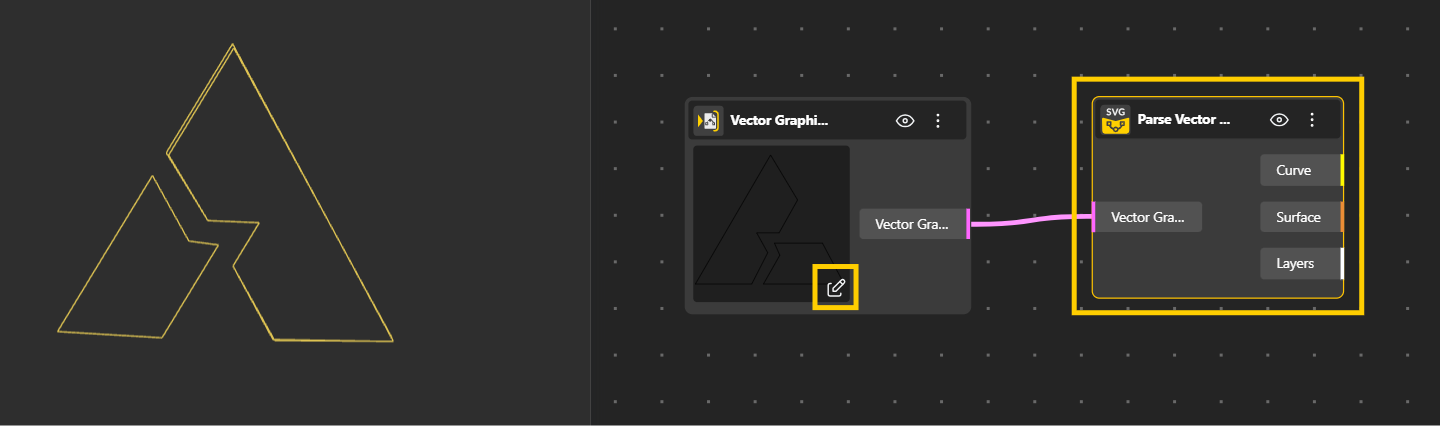
Add the Parse Vector Graphics node to your workspace.
Connect it to a Vector Graphics Input node.
Click on the edit icon on the node.
Upload your desired vector file (e.g., SVG).
This is useful for turning logos, illustrations, or 2D designs into geometry that can be used for modeling, paneling, or fabrication.
This node is especially powerful for workflows that start from 2D design assets, such as:
Logos → turn brand marks into 3D geometry
Illustrations → convert stylized artwork into surfaces or solids
Technical drawings → transform vector layouts into precise modeling curves
Patterns and graphic motifs → use them for paneling, engraving, CNC paths, or fabrication
The Filter by Layer Operation node allows you to filter geometry based on the type of operation assigned to it, such as cutting, engraving, or other fabrication-specific actions. This is especially useful in CAM workflows where different parts of a model need to be processed differently depending on their role in manufacturing.
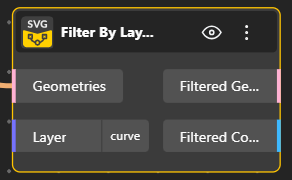
Filter geometry by operation type: Separate elements based on operations like cutting, engraving, or drilling.
Organize fabrication workflows
Manage different machining steps more efficiently by isolating relevant geometry.
Prepare geometry for toolpaths
Send only the required parts of your model into specific CAM operations.
Add the Filter by Layer node to your workspace.
Connect your geometry (for example, from a Parse Vector Graphics node) to the Geometries input.
Specify the Layer you want to filter (e.g., a layer name or type such as curve).
The node will output:
Filtered Geometry → only the geometry from the selected layer
Filtered Count → number of elements in that laye
