
The Analysis nodes help you understand your geometry beyond its shape. These tools give you detailed insight into how your geometry behaves. They are essential for verifying accuracy, optimizing designs, and driving parametric relationships with data-driven logic.
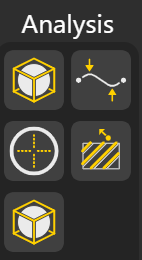
Bounding Box: Generates the smallest box that fully encloses the input geometry (curve, surface, or solid). Useful for spatial analysis, alignment, or measuring extents. Output Port:
Point: Gives Mid-Point of the geometry
Width: returns width
Length: returns length
Height: returns height
Area: Returns area
Extremes: Finds the extreme points of geometry along a specified plane (XY, YZ, XZ). Outputs points that represent the Highest and Lowest positions of the geometry.
Centroid: Calculates the geometric center and the mass center of a shape, surface, or solid. Useful for positioning, rotation, or balancing operations. Output ports:
Mass: Mass Center
Bbox: Geometric center
Contour: Generates a series of equally spaced curves by slicing geometry along a given direction or plane. Useful for section analysis, fabrication layouts, or pattern extraction.
Bounding Box Union: Generates the smallest box that fully encloses the input geometry (curve, surface, or solid) in the specified plane.